Your sheet music, with feedback while you play
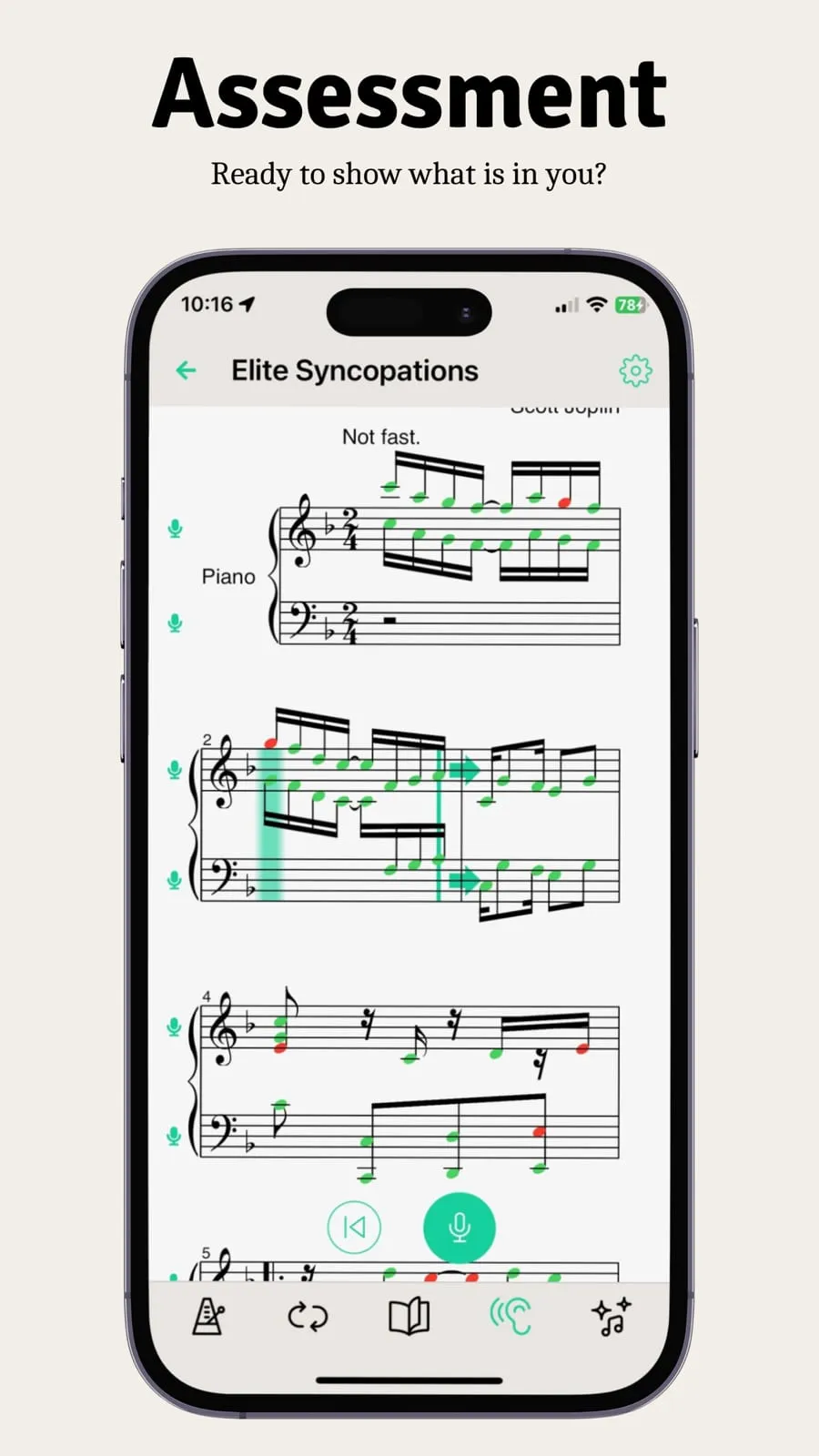
Open a MusicXML file, play your part, and PracticeBird colours each note green, orange or red as it compares what you play with the score.


How it works
Get a MusicXML file
Download one from a library such as OpenScore, or export it from a notation program such as MuseScore Studio or Sibelius. Where to find sheet music
Open it in PracticeBird
Tap + in the “Library”, or use “Open with” or “Share” in another app. A new library starts with thirteen pieces, from Bach to Joplin.
Practise with feedback while you play
Switch on “Instant Pitch Monitoring”, choose your part and play. PracticeBird listens through the microphone and shows how you did: “Notes hit”, “Pitch” and “Rhythm”.
What PracticeBird does for you
See where you went off
“Instant Pitch Monitoring” compares what you play with your part of the score. Notes turn green when you played them well, orange when you were a little off and red where you need more practice. After each take you see “Notes hit”, “Pitch” and “Rhythm” in percent and up to 100 “Practice Points”.
Listen to your last take
PracticeBird keeps your last take on your device so you can listen to it. The next take replaces it. Nothing is uploaded.
Practise the hard bars on repeat
Tap where a loop starts and where it ends. Add a pause or a count-in between rounds, or let the tempo rise from one round to the next.
Play with the other parts
PracticeBird plays the score with built-in sounds. Mute your own part and play along, solo one part, or turn the others down in the “Volume Mixer”.
Your tempo, your key
Set the tempo in BPM, with a metronome and a count-in. Transpose the whole piece up to 24 semitones up or down, or set a part as a B♭ trumpet, alto saxophone or other transposing instrument. Tune the reference pitch between 220 and 880 Hz.
Pages that turn themselves
“Auto Page Turn” listens through the microphone and follows you at your own tempo. If it loses track, tap your current position in the score.
Play it through
“Assessment mode” checks a full run of the piece at its original tempo, without loops.
See your practice add up
The “You” tab counts your “Practice Time”, “Practice Points” and “Day Streak”, for today, this week, this month and this year.
Who it is for
Musicians who read music
You know the basics and want to practise the pieces you choose, with something that listens.
Teachers and their students
Give your students the MusicXML file. Each opens it on their own phone or tablet and practises with feedback at home.
Choirs and ensembles
Every singer or player opens the same file and practises their own part: solo it, mute it to play or sing along with the others, or slow the tempo down.
Every feature, no subscription
Since 8 November 2026 every feature of PracticeBird is free, without a subscription. If you paid for Pro: renewals have ended in both stores, there is nothing to do.
There is no account and no sign-in. Your sheet music stays in the app on your device.

Where to find sheet music
PracticeBird needs MusicXML. We list libraries with MusicXML downloads, show how to export from MuseScore Studio, Sibelius, Dorico and Flat, and say what to expect from MIDI and PDF.
Questions people ask
Is PracticeBird free?
PracticeBird costs nothing to download, and since 8 November 2026 every feature works without a subscription.
Which files can PracticeBird open?
PracticeBird is made for MusicXML, the file format notation programs use to exchange sheet music. It opens files ending in .musicxml, .xml and .mxl (compressed MusicXML, which PracticeBird unpacks itself).
Which devices does it run on?
iPhone and iPad with iOS 15 or later, and Android devices with Android 6.0 or later.

Get PracticeBird
For iPhone and iPad with iOS 15 or later, and for Android 6.0 or later.